


MyBatis的常用注解
@Insert:实现新增
@Update:实现更新
@Delete:实现删除
@Select:实现查询
@Result:实现结果集封装
@Results:可以与@Result 一起使用,封装多个结果集
@One:实现一对一结果集封装
@Many:实现一对多结果集封装
MyBatis的增删改查
注意:数据表以及各种配置参考Mybatis的基本使用
案例目录结构
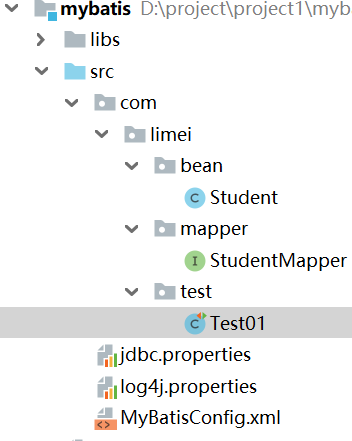
MyBatisConfig.xml核心配置
<?xml version="1.0" encoding="UTF-8" ?>
<!--MyBatis的DTD约束-->
<!DOCTYPE configuration PUBLIC "-//mybatis.org//DTD Config 3.0//EN" "http://mybatis.org/dtd/mybatis-3-config.dtd">

<!--configuration 核心根标签-->
<configuration>

 <!--引入数据库连接的配置文件-->
 <properties resource="jdbc.properties"/>

 <!--配置LOG4J-->
 <settings>
     <setting name="logImpl" value="log4j"/>
 </settings>

 <!--起别名-->
 <typeAliases>
     <typeAlias type="com.limei.bean.Student" alias="student"/>
     <!--<package name="com.itheima.bean"/>-->
 </typeAliases>

 <!--environments配置数据库环境,环境可以有多个。default属性指定使用的是哪个-->
 <environments default="mysql">
     <!--environment配置数据库环境  id属性唯一标识-->
     <environment id="mysql">
         <!-- transactionManager事务管理。  type属性,采用JDBC默认的事务-->
         <transactionManager type="JDBC"></transactionManager>
         <!-- dataSource数据源信息   type属性 连接池-->
         <dataSource type="POOLED">
             <!-- property获取数据库连接的配置信息 -->
             <property name="driver" value="${driver}" />
             <property name="url" value="${url}" />
             <property name="username" value="${username}" />
             <property name="password" value="${password}" />
         </dataSource>
     </environment>
 </environments>

 <!-- mappers引入映射配置文件 -->
 <mappers>
     <!--扫描使用注解的类所在的包-->
     <package name="com.limei.mapper"></package>
 </mappers>
</configuration>
StudentMapper接口
//查询全部
 @Select("SELECT * FROM student")
 public abstract List<Student> selectAll();

 //新增数据
 @Insert(" INSERT INTO student VALUES (#{id},#{name},#{birthday},#{address})")
 public abstract Integer insert(Student stu);

 //修改数据
 @Update(" UPDATE student SET name = #{name},birthday = #{birthday},address=#{address} WHERE id = #{id}")
 public abstract Integer update(Student stu);

 //删除数据
 @Delete("DELETE FROM student WHERE id = #{id}")
 public abstract Integer delete(String id);
Test01测试类,查询所有
public class Test01 {

 //String类型转换为Date类型
 public Date conversionDate(String s){
     String str =s;
     Date date=null;
     SimpleDateFormat sdf=null;
     try {
         sdf = new SimpleDateFormat ( "yyyy-MM-dd" );
         date = sdf.parse ( str );
     } catch (ParseException e) {
         e.printStackTrace ();
     }
     return date;
 }

  //查询所有
 @Test
 public void selectAll() throws Exception{
     //1.加载核心配置文件
     InputStream is = Resources.getResourceAsStream("MyBatisConfig.xml");

     //2.获取SqlSession工厂对象
     SqlSessionFactory sqlSessionFactory = new SqlSessionFactoryBuilder ().build(is);

     //3.通过工厂对象获取SqlSession对象
     SqlSession sqlSession = sqlSessionFactory.openSession(true);

     //4.获取StudentMapper接口的实现类对象
     StudentMapper mapper = sqlSession.getMapper ( StudentMapper.class );

     //5.调用实现类对象中的方法,接收结果
     List<Student> list = mapper.selectAll ();

     //6.处理结果
     for (Student student: list) {
         System.out.println(student);
     }

     //7.释放资源
     sqlSession.close();
     is.close();
 }
}
添加操作,只需要改第五步,第六步遍历删除:
     Date date = conversionDate ( "1998-09-01" );
     Student student=new Student ( "10010","张三",date,"北京市" );
     Integer insert = mapper.insert ( student );
更改操作,只需要改第五步,第六步遍历删除:
     Date date = conversionDate ( "1998-09-01" );
      Student student=new Student ( "10010","李四",date,"北京市" );
     Integer update = mapper.update ( student );
删除操作,只需要改第五步,第六步遍历删除:
     Date date = conversionDate ( "1998-09-01" );
     Integer delete = mapper.delete ( "10010" );
注解开发总结
注解可以简化开发操作,省略映射配置文件的编写。
常用注解
@Select(“查询的 SQL 语句”):执行查询操作注解
@Insert(“查询的 SQL 语句”):执行新增操作注解
@Update(“查询的 SQL 语句”):执行修改操作注解
@Delete(“查询的 SQL 语句”):执行删除操作注解
配置映射关系
<mappers> <package name="接口所在包"/> </mappers>
评论 (0)